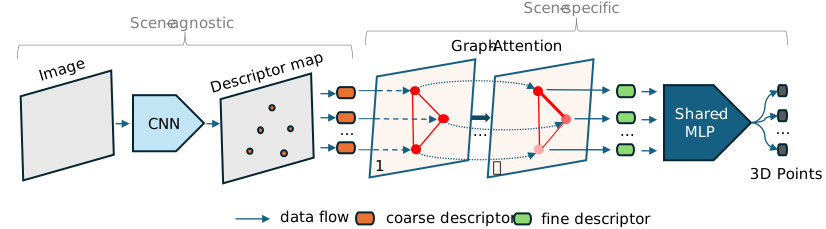
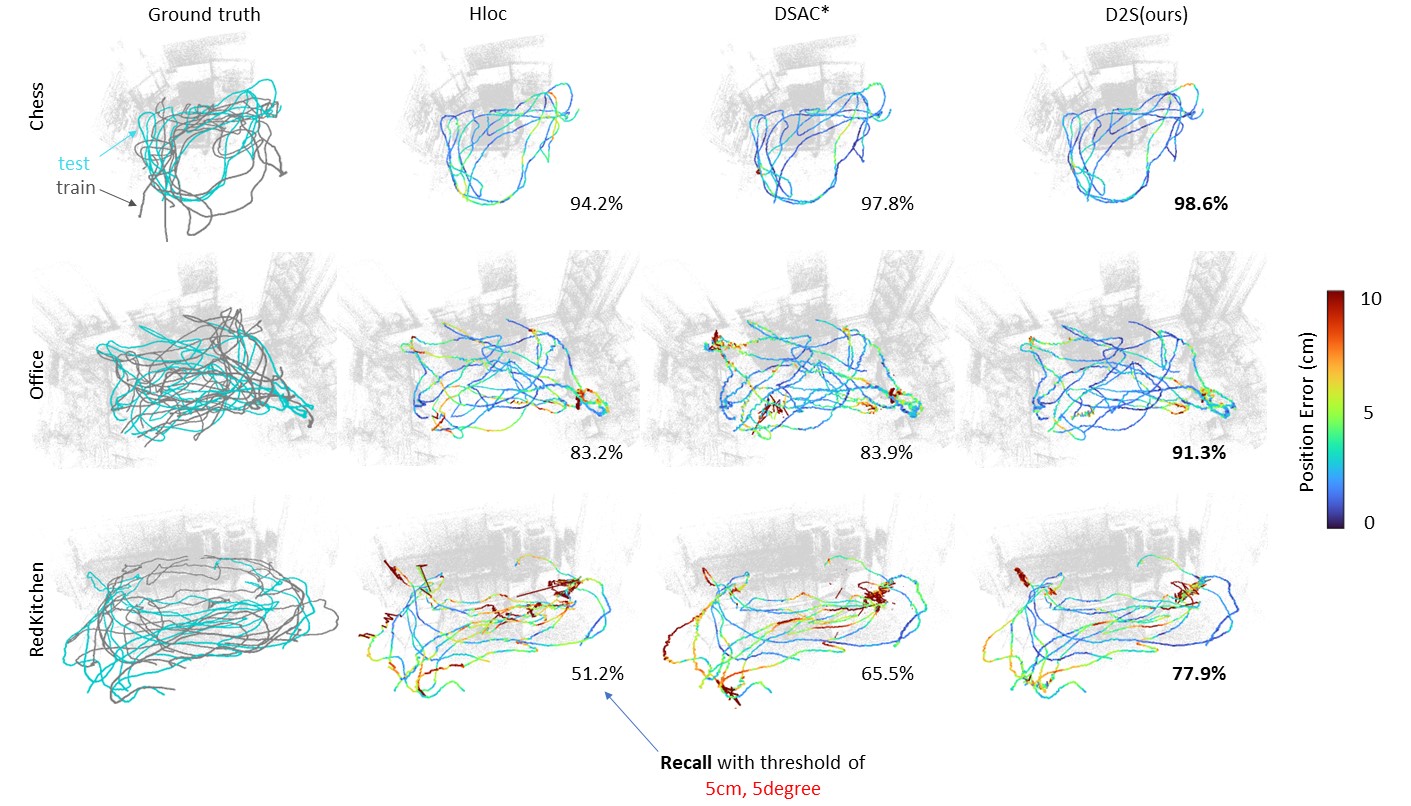
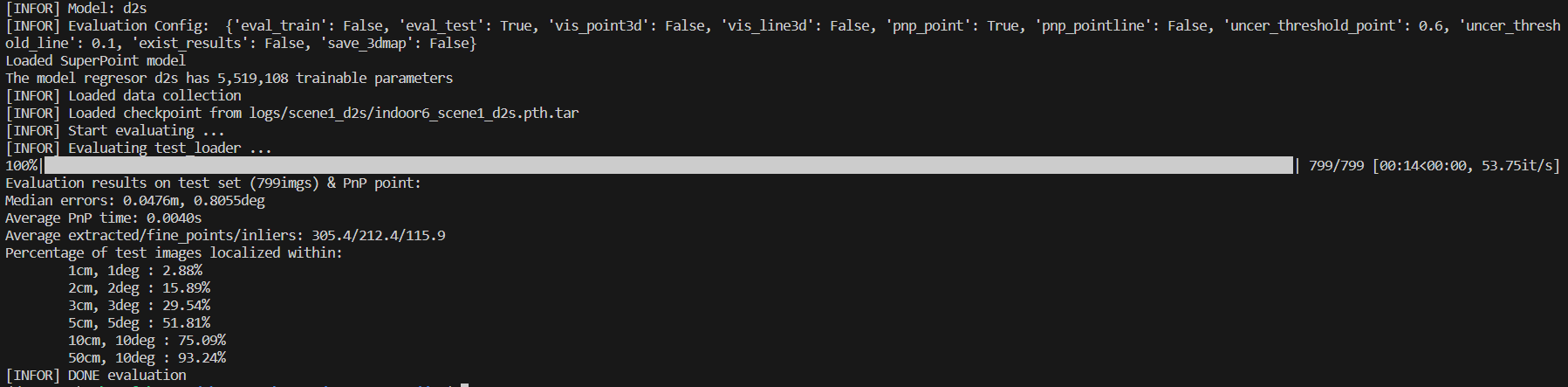
This repository contains the Pytorch implementation of our papers: - [D2S: Representing Sparse Descriptors and 3D Coordinates for Camera Relocalization](https://thpjp.github.io/d2s/) - [Fast and Lightweight Scene Regressor for Camera Relocalization](https://arxiv.org/abs/2212.01830) (feat2map branch) Todo list: - [x] release code - [x] run with custom data - [x] add inference with pre-trained models ## Installation D2S is based on PyTorch. The main framework is implemented in Python. Python 3.9 + required packages ``` git clone https://github.com/ais-lab/d2s.git cd d2s conda create --name d2s python=3.9 conda activate d2s # Refer to https://pytorch.org/get-started/previous-versions/ to install pytorch compatible with your CUDA python -m pip install torch==1.12.0 torchvision==0.13.0 python -m pip install -r requirements.txt ``` D2S uses [hierarchical localization toolbox](https://github.com/cvg/Hierarchical-Localization)(hloc) to label descriptors coordinates. However, we provided scripts to download all preprocessed datasets for an immediate run. ## Dataset ### Supported Datasets - [7scenes](https://www.microsoft.com/en-us/research/project/rgb-d-dataset-7-scenes/) - [Indoor6](https://github.com/microsoft/SceneLandmarkLocalization) - [Cambridge Landmarks](http://mi.eng.cam.ac.uk/projects/relocalisation/#dataset) - [BKC Ritsumeikan](https://drive.google.com/file/d/1XEdnrFTzThruG15pW2A_1jYAxtpYbwq5/view?usp=sharing) ### Download preprocessed datasets Please run the provided scripts to prepare and download the data which has been preprocessed by running: 7scenes ``` ./prepare_scripts/seven_scenes.sh ``` Cambridge Landmarks ``` ./prepare_scripts/cambridge.sh ``` Indoor-6 ``` ./prepare_scripts/indoor6.sh ``` ## Evaluation with pre-trained models Please download the pre-trained models by running: ``` ./prepare_scripts/download_pre_trained_models.sh ``` For example, to evaluate Indoor6 scene1: ``` python runners/eval.py --dataset indoor6 --scene scene1 -expv d2s ``` You can receive a result like this:
For pre-trained models of 7scenes, you can download it from [here](https://drive.google.com/file/d/1bQNctr2lpFVIhw2DjAmcpzwE-RdRD-yG/view?usp=sharing) ## Training ``` python runners/train.py --dataset indoor6 --scene scene1 -expv d2s ``` ## Run with your own dataset ### Install COLMAP and Hloc - Install [COLMAP](https://colmap.github.io/install.html) from source or just run: ``` sudo snap install colmap ``` - Install [Hloc](https://github.com/thuanaislab/Hierarchical-Localization) ``` git clone --recursive https://github.com/thuanaislab/Hierarchical-Localization/ cd Hierarchical-Localization/ conda activate d2s python -m pip install -e . cd .. ``` ### Prepare your own data Create a ```custom_dataset``` folder as follow and put all images in ```images``` folder: ``` d2s ├── custom_dataset │ ├── images | | ├── image_1.jpg | | ├── ... | | └── image_N.jpg ├── ... └── README.md ``` ### Run entire pipeline on your own data Then run this command: ``` ./run_custom_data_pipeline.sh custom_dataset/ ``` ## BibTex Citation If you find this project useful, please consider citing: ``` @article{bui2024d2s, title={D2S: Representing sparse descriptors and 3D coordinates for camera relocalization}, author={Bui, Bach-Thuan and Bui, Huy-Hoang and Tran, Dinh-Tuan and Lee, Joo-Ho}, journal={IEEE Robotics and Automation Letters}, year={2024} } @article{bui2022fast, title={Fast and Lightweight Scene Regressor for Camera Relocalization}, author={Bui, Thuan B and Tran, Dinh-Tuan and Lee, Joo-Ho}, journal={arXiv preprint arXiv:2212.01830}, year={2022} } ```